
| 일 | 월 | 화 | 수 | 목 | 금 | 토 |
|---|---|---|---|---|---|---|
| 1 | 2 | |||||
| 3 | 4 | 5 | 6 | 7 | 8 | 9 |
| 10 | 11 | 12 | 13 | 14 | 15 | 16 |
| 17 | 18 | 19 | 20 | 21 | 22 | 23 |
| 24 | 25 | 26 | 27 | 28 | 29 | 30 |
| 31 |
- 리뷰 크롤링
- 워게임
- 백준
- Selenium
- ctf
- 백준2557
- Welcome_rev
- split()함수
- c언어
- 댓글크롤링
- Python
- MySQL
- 후기 크롤링
- 크롤링
- 유튜브크롤링
- 리눅스
- reversing
- 웹크롤링
- Reversing Me
- Baekjoon
- Linux
- 네이버스토어 후기
- 파이썬
- HackCTF
- 리버싱
- Handray
- SQL
- split()
- Bandit
- 백준 1008번
- Today
- Total
root@hfairy:~$
[웹크롤링] 유튜브 숏츠 댓글 크롤링하기 본문
오늘은!
유튜브 쇼츠 영상에서 댓글을 크롤링하는 코드를 작성할 것이다.
MySQL 서버에 연결해서 데이터베이스를 구축하였고, HeidiSQL을 이용하면 MySQL과 연결해 훨씬 수월하게 데이터를 관리할 수 있다. 삽입이나 삭제도 쉽고 시각적으로도 보기 편하다.
하지만 쉽게 수정하다 보니 SQL 명령문을 계속 까먹어서 간단한 건 직접 쿼리를 작성하려고 노력할 것이다..ㅎㅎ
selenium이란?
selenium은 웹 브라우저 자동화 툴이다.
쉽게 말해 브라우저를 직접 실행하지 않고 원하는 기능을 코드로 입력하면 selenium의 메소드를 통해 웹 브라우저의 기능을 사용할 수 있는 것이다.
나는 파이참을 사용하고 있고, 아래 사진처럼 패키지 설치할 수 있는 메뉴가 있는데 나는 이미 설치되어 있어서 오른쪽에 'Uninstall'이라고 뜨지만 설치가 안되어 있으면 'Install'이라고 뜨니 눌러서 설치하면 된다.

다른 방법으로는 아래처럼 파이참 내부 터미널에 'pip install selenium'을 입력해서 설치할 수 있다.
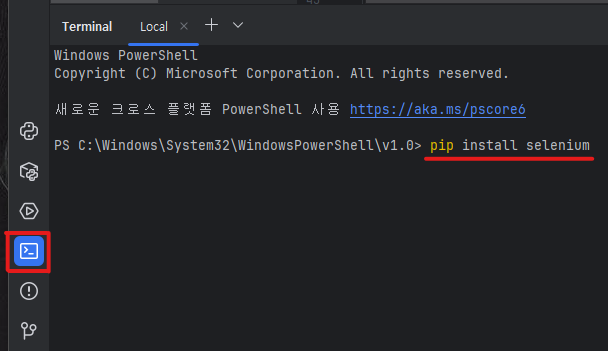
이때 브라우저에 맞는 webdriver도 설치해야 하는데 나는 아래 링크에서 설치하였다.
https://googlechromelabs.github.io/chrome-for-testing/
Chrome for Testing availability
chrome-headless-shellmac-arm64https://storage.googleapis.com/chrome-for-testing-public/137.0.7151.68/mac-arm64/chrome-headless-shell-mac-arm64.zip200
googlechromelabs.github.io
나는 윈도우 64비트를 사용하고 있기 때문에 'win64' 버전을 다운받았다.
(각 운영체제에 따라 작성된 URL에 접속하면 다운로드가 실행된다.)

다운로드한 파일은 웹크롤링 코드를 저장할 폴더 안에 같이 넣어놓았다.
데이터베이스 구축
아래는 내가 구축한 DB와 table 정보이다.
DB name: youtube
table name: youtube_crawling
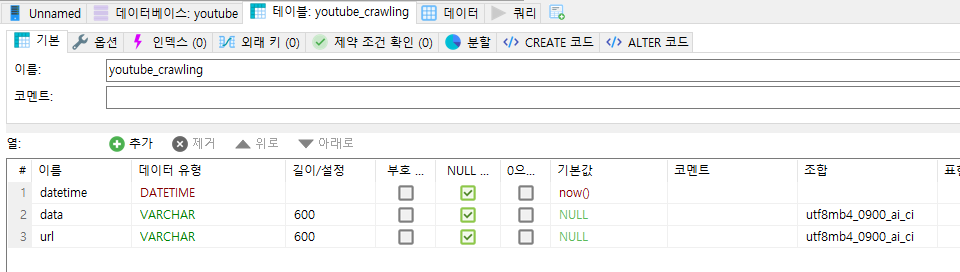
'datetime' : 크롤링한 시간을 기록하기 위한 열
'data' : 댓글 내용을 저장할 열
'url' : 어떤 영상에서 긁어온 댓글인지 파악하기 위해 영상의 url을 저장할 열
코드작성
요즘 다이소 아이템들이 인기가 있어서 유튜브에 '다이소 추천템'이라고 검색한 후 몇 가지 영상을 선택하여 크롤링에 사용하였다.
from selenium import webdriver
import time
import mysql.connector
from selenium.webdriver import Keys
from selenium.webdriver.common.by import By

# 검색어: 다이소 추천템

url1 = "https://www.youtube.com/shorts/s6o3xpXSYFs"
url2 = "https://www.youtube.com/shorts/MfjnCiRxIu0"

url_list = [ url1, url2 ]

# CHROME 실행
driver = webdriver.Chrome()

# 테이블에 삽입할 댓글과 url 담기 위한 리스트
# url은 어떤 영상에서 크롤링한 댓글인지 파악하기 위해 수집
comment_text_list = []

# url_list 안에 있는 url 모두 접속
for url in url_list:
	# 브라우저 열기. 웹 로딩되는 시간 2초정도 대기.
    driver.get(url)
    time.sleep(2)

    # 댓글 버튼 클릭 -> 댓글창 띄움
    element = driver.find_element(By.ID, "comments-button").find_element(By.CLASS_NAME, "yt-spec-button-shape-next")
    driver.execute_script("arguments[0].click();", element)

    # 댓글이 로딩 3초정도 대기
    time.sleep(3)


    # 댓글 더보기 기능을 위해 댓글창에서 아래로 스크롤하기(PAGE_DOWN 이용)
    comment_elements = driver.find_elements(By.ID, "contents")[1]

    for scroll_i in range(1, 15):
        comment_elements.send_keys(Keys.PAGE_DOWN)
        time.sleep(0.4)

	# 댓글 내용 찾기
    comment_elements2 = comment_elements.find_elements(By.ID, "content-text")

	# 댓글 내용을 comment_text_list에 저장
    for comment_element in comment_elements2:
        comment_text_list.append([comment_element.text, url])


	# 댓글 개수 출력
    print("댓글 개수", len(comment_text_list))


driver.quit()
이 코드를 통해 댓글은 수집하였고 수집한 댓글을 테이블 내에 데이터로 저장하는 코드를 아래에 함께 작성하였다.
host = '127.0.0.1'
database = 'youtube'
user = 'root'
password = '****' # 비밀번호 입력

# MySQL 서버에 연결
conn = mysql.connector.connect(host=host, database=database, user=user, password=password)

# cursor 생성 : DB와 상호작용하여 SQL문 실행할 수 있는 환경 제공
cursor = conn.cursor()

# 데이터 삽입 쿼리 작성
query = "INSERT INTO youtube_crawling (data, url) VALUES (%s, %s)"


for comment_text in comment_text_list:
    insert_data = (comment_text[0], comment_text[1])
    cursor.execute(query, insert_data)

# commit : 변경 사항 저장하여 DB에 최종 반영됨
conn.commit()
# 연결 종료
conn.close()
여기서 잠깐.. 간혹 데이터의 길이가 테이블 생성시에 설정한 크기보다 클 때 'Data too long for column 'data' at row 1' 라는 오류가 뜰 수 있다. 이 문제를 해결하기 위해 쿼리에 전달할 'comment_text[0]'의 크기를 600으로 제한할 것이다. 변경된 코드는 아래와 같다.
host = '127.0.0.1'
database = 'youtube'
user = 'root'
password = '****' # 비밀번호 입력

# MySQL 서버에 연결
conn = mysql.connector.connect(host=host, database=database, user=user, password=password)

# cursor 생성 : DB와 상호작용하여 SQL문 실행할 수 있는 환경 제공
cursor = conn.cursor()

# 데이터 삽입 쿼리 작성
query = "INSERT INTO youtube_crawling (data, url) VALUES (%s, %s)"


for comment_text in comment_text_list:
	# data에 넣을 값의 크기 600으로 제한(600자까지만 자름)
    insert_data = (comment_text[0][:600], comment_text[1])
    cursor.execute(query, insert_data)

# commit : 변경 사항 저장하여 DB에 최종 반영됨
conn.commit()
# 연결 종료
conn.close()
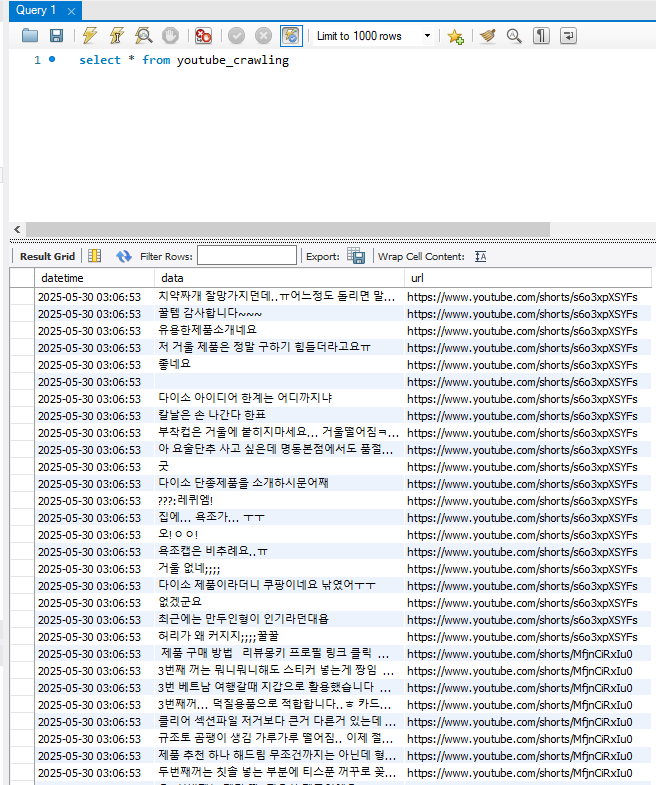
코드 실행의 결과 삽입된 데이터를 확인하면 아래와 같이 잘 저장된 것을 알 수 있다.
완성된 코드 1
from selenium import webdriver
import time
import mysql.connector
from selenium.webdriver import Keys
from selenium.webdriver.common.by import By

# 검색어: 다이소 추천템

url1 = "https://www.youtube.com/shorts/s6o3xpXSYFs"
url2 = "https://www.youtube.com/shorts/MfjnCiRxIu0"

url_list = [ url1, url2 ]

# CHROME 실행
driver = webdriver.Chrome()

# 테이블에 삽입할 댓글과 url 담기 위한 리스트
# url은 어떤 영상에서 크롤링한 댓글인지 파악하기 위해 수집
comment_text_list = []

# url_list 안에 있는 url 모두 접속
for url in url_list:
	# 브라우저 열기. 웹 로딩되는 시간 2초정도 대기.
    driver.get(url)
    time.sleep(2)

    # 댓글 버튼 클릭 -> 댓글창 띄움
    element = driver.find_element(By.ID, "comments-button").find_element(By.CLASS_NAME, "yt-spec-button-shape-next")
    driver.execute_script("arguments[0].click();", element)

    # 댓글이 로딩 3초정도 대기
    time.sleep(3)


    # 댓글창에서 아래로 스크롤하기(PAGE_DOWN 이용)
    comment_elements = driver.find_elements(By.ID, "contents")[1]

    for scroll_i in range(1, 15):
        comment_elements.send_keys(Keys.PAGE_DOWN)
        time.sleep(0.4)

	# 댓글 내용 찾기
    comment_elements2 = comment_elements.find_elements(By.ID, "content-text")

	# 댓글 내용을 comment_text_list에 저장
    for comment_element in comment_elements2:
        comment_text_list.append([comment_element.text, url])


	# 댓글 개수 출력
    print("댓글 개수", len(comment_text_list))

driver.quit()


host = '127.0.0.1'
database = 'youtube'
user = 'root'
password = '****' # 비밀번호 입력

# MySQL 서버에 연결
conn = mysql.connector.connect(host=host, database=database, user=user, password=password)

# cursor 생성 : DB와 상호작용하여 SQL문 실행할 수 있는 환경 제공
cursor = conn.cursor()

# 데이터 삽입 쿼리 작성
query = "INSERT INTO youtube_crawling (data, url) VALUES (%s, %s)"


for comment_text in comment_text_list:
	# data에 넣을 값의 크기 600으로 제한(600자까지만 자름)
    insert_data = (comment_text[0][:600], comment_text[1])
    cursor.execute(query, insert_data)

# commit : 변경 사항 저장하여 DB에 최종 반영됨
conn.commit()
# 연결 종료
conn.close()
텍스트 파일로 URL 관리하기
추가적으로 더 많은 영상에서 댓글을 크롤링하기 위해 URL을 텍스트 파일로 저장하고 파일을 읽는 방법이 있는데, 이 방법을 사용하면 코드 길이도 줄일 수 있고 더 많은 영상 주소를 저장하고 삭제하기 편리하다.
먼저, 아래와 같이 txt 파일을 생성하고 여러개의 영상 주소를 저장한다. 나는 일단 11개 정도를 작성하였다.
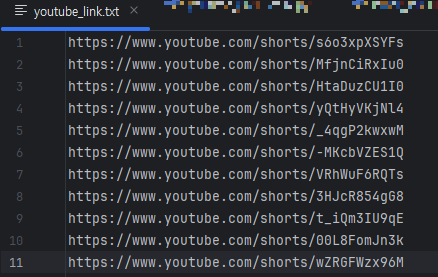
그리고 아래와 같이 수정해 주면 된다.
url1 = "https://www.youtube.com/shorts/s6o3xpXSYFs"
url2 = "https://www.youtube.com/shorts/MfjnCiRxIu0"

url_list = [ url1, url2 ]
↓
with open("./youtube_link.txt") as fr:
    url_list = [row.strip() for row in fr.readlines()]
완성된 코드 2
from selenium import webdriver
import time
import mysql.connector
from selenium.webdriver import Keys
from selenium.webdriver.common.by import By

# 검색어: 다이소 추천템
# 영상 링크 저장한 텍스트 파일에서 주소 읽어옴
with open("./youtube_link.txt") as fr:
    url_list = [row.strip() for row in fr.readlines()]

# CHROME 실행
driver = webdriver.Chrome()

# 테이블에 삽입할 댓글과 url 담기 위한 리스트
# url은 어떤 영상에서 크롤링한 댓글인지 파악하기 위해 수집
comment_text_list = []

# url_list 안에 있는 url 모두 접속
for url in url_list:
	# 브라우저 열기. 웹 로딩되는 시간 2초정도 대기.
    driver.get(url)
    time.sleep(2)

    # 댓글 버튼 클릭 -> 댓글창 띄움
    element = driver.find_element(By.ID, "comments-button").find_element(By.CLASS_NAME, "yt-spec-button-shape-next")
    driver.execute_script("arguments[0].click();", element)

    # 댓글이 로딩 3초정도 대기
    time.sleep(3)


    # 댓글창에서 아래로 스크롤하기(PAGE_DOWN 이용)
    comment_elements = driver.find_elements(By.ID, "contents")[1]

    for scroll_i in range(1, 15):
        comment_elements.send_keys(Keys.PAGE_DOWN)
        time.sleep(0.4)

	# 댓글 내용 찾기
    comment_elements2 = comment_elements.find_elements(By.ID, "content-text")

	# 댓글 내용을 comment_text_list에 저장
    for comment_element in comment_elements2:
        comment_text_list.append([comment_element.text, url])


	# 댓글 개수 출력
    print("댓글 개수", len(comment_text_list))

driver.quit()


host = '127.0.0.1'
database = 'youtube'
user = 'root'
password = '****' # 비밀번호 입력

# MySQL 서버에 연결
conn = mysql.connector.connect(host=host, database=database, user=user, password=password)

# cursor 생성 : DB와 상호작용하여 SQL문 실행할 수 있는 환경 제공
cursor = conn.cursor()

# 데이터 삽입 쿼리 작성
query = "INSERT INTO youtube_crawling (data, url) VALUES (%s, %s)"


for comment_text in comment_text_list:
	# data에 넣을 값의 크기 600으로 제한(600자까지만 자름)
    insert_data = (comment_text[0][:600], comment_text[1])
    cursor.execute(query, insert_data)

# commit : 변경 사항 저장하여 DB에 최종 반영됨
conn.commit()
# 연결 종료
conn.close()
'공부 > 빅데이터 분석' 카테고리의 다른 글
| [MySQL] .csv파일로 저장하고 엑셀에서 열기 (0) | 2025.12.27 |
|---|---|
| [웹크롤링] 네이버 쇼핑(네이버스토어) 후기 크롤링 (랭킹순, 별점 낮은순) (0) | 2025.12.27 |
| [웹크롤링] 네이버 스마트스토어 리뷰 크롤링 (12) | 2025.07.10 |
| [웹크롤링] 쿠팡 후기 크롤링 (2) | 2025.07.04 |
| [MySQL] 데이터베이스 구축 및 테이블 생성 (0) | 2025.07.02 |


