
| 일 | 월 | 화 | 수 | 목 | 금 | 토 |
|---|---|---|---|---|---|---|
| 1 | 2 | |||||
| 3 | 4 | 5 | 6 | 7 | 8 | 9 |
| 10 | 11 | 12 | 13 | 14 | 15 | 16 |
| 17 | 18 | 19 | 20 | 21 | 22 | 23 |
| 24 | 25 | 26 | 27 | 28 | 29 | 30 |
| 31 |
- 파이썬
- SQL
- Python
- split()
- Reversing Me
- 웹크롤링
- 백준 1008번
- split()함수
- Welcome_rev
- 리눅스
- 후기 크롤링
- 리뷰 크롤링
- 워게임
- Linux
- 유튜브크롤링
- 댓글크롤링
- c언어
- 백준
- Handray
- Bandit
- 네이버스토어 후기
- reversing
- 크롤링
- 리버싱
- 백준2557
- ctf
- Baekjoon
- MySQL
- HackCTF
- Selenium
- Today
- Total
root@hfairy:~$
[웹크롤링] 쿠팡 후기 크롤링 본문
https://ryd-gmswjr.tistory.com/11
[MySQL] 데이터베이스 구축 및 테이블 생성 _ 1
MySQL을 기반으로 실습 진행하였으며 버전은 8.1.0이다.(mysql --version) 데이터베이스 생성CREATE DATABASE IF NOT EXISTS cosmetic_db; 'CREATE DATABASE'를 이용해 'cosmetic_db'라는 데이터베이스를 생성한다.이때 중복
ryd-gmswjr.tistory.com
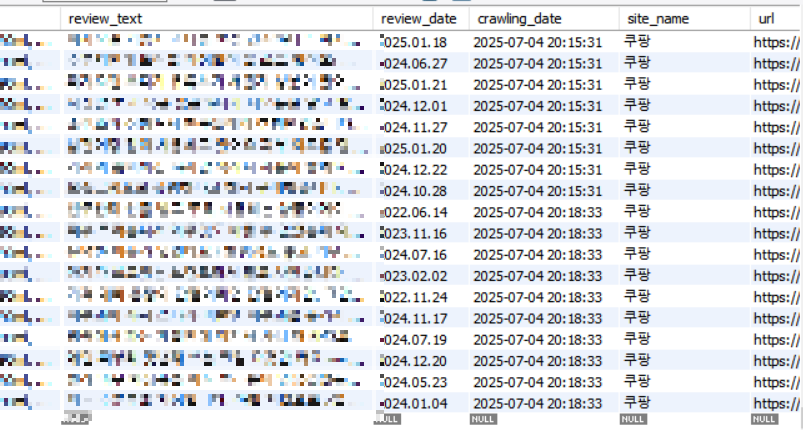
위 페이지에서 구축한 테이블에 데이터를 수집하는 과정을 작성할 예정이다.
DB name: cosmetic_db
Table name: derma_review_tb
각 column은 아래와 같음
review_num(primary key): 고유번호
product_name: 제품명
review_text: 리뷰 내용
review_date: 리뷰 작성 일자
crawling_date: 크롤링한 날짜 및 시간
site_name: 크롤링한 사이트 이름(쿠팡, 네이버쇼핑 등)
url: 크롤링한 사이트 url
※ ※ ※ ※ ※ 오류날 수 있음 주의...^-^※ ※ ※ ※ ※
Visual Studio Code에서 작업하였다.
설치되지 않은 라이브러리들은 터미널에 입력해서 설치하였다.
예를 들면 ' pip install selenium ' 이렇게.

MySQL 연결 코드
MySQL에 연동할 코드는 다른 코드에서도 편리하게 사용할 수 있도록 별개의 파일로 저장하였다.
파일명은 'mysql_info'
아래 코드에서 "****"로 처리한 password에는 실제 password 넣으면 된다.
import mysql.connector
import subprocess
import re

# MySQL 서버 연결 정보
host = '127.0.0.1'
database = 'cosmetic_db'
user = 'root'
password = '****'

# MySQL 서버에 연결
conn = mysql.connector.connect(host=host, database=database, user=user, password=password)

# 커서 생성
cursor = conn.cursor()

def kill_chrome():
    # KILL, TASKKILL / 프로세스를 종료하는 명령을 의미
    subprocess.call("TASKKILL /f /IM CHROME.EXE")
    subprocess.call("TASKKILL /f /IM CHROMEDRIVER.EXE")


def remove_tag(_input_data):
    p = re.compile('@[a-zA-Z0-9_]+')
    data = p.search(_input_data)
    if data is not None:
        tag_data = p.findall(_input_data)
        output_data = _input_data
        for tag in tag_data:
            output_data = output_data.replace(tag, '')
        return output_data.strip()
    else:
        return _input_data
    #print(output_data)
최종코드
url에는 후기를 크롤링할 제품 페이지의 url을 넣으면 된다.
from selenium import webdriver
from selenium.webdriver.common.by import By
from selenium.webdriver.support.ui import WebDriverWait
from selenium.webdriver.support import expected_conditions as EC
from selenium.common.exceptions import TimeoutException
from selenium.webdriver.common.alert import Alert
import time
import random
from mysql_info import *
from selenium.webdriver.common.keys import Keys
from selenium.webdriver.common.action_chains import ActionChains

site_name = '쿠팡'

driver = webdriver.Chrome()
url = "https://www.coupang.com/..."
driver.get(url)

action = ActionChains(driver)

time.sleep(3)

# 스크롤
for c in range(0,5):
    driver.find_element(By.TAG_NAME,'body').send_keys(Keys.PAGE_DOWN)
    time.sleep(1)

# 유니크 인덱스 추가 후 수정한 쿼리
query = "INSERT IGNORE INTO derma_review_tb (product_name, review_text, review_date, site_name, url) VALUES (%s, %s, %s, %s, %s)"

random_delay = random.uniform(2, 7)

page_index = 1

unique_review_texts = set()

# for loop_i in range(1, 100):
while True:
    review_list = []
    print(f"\n--- 페이지 {page_index} 리뷰 수집 시작 ---")
    time.sleep(random_delay)

    try:
        # 최대 10초 동안 alert이 나타날 때까지 대기
        WebDriverWait(driver, 5).until(EC.alert_is_present())
        # alert 객체로 전환
        alert = Alert(driver)
        # alert 수락
        alert.accept()

    except TimeoutException:
        # 10초 동안 alert이 나타나지 않으면 예외 발생
        print("Alert이 나타나지 않았습니다.")
        pass

    # 상품평 틀
    item_elements = driver.find_element(By.CLASS_NAME, "js_reviewArticleListContainer").find_elements(By.TAG_NAME, "article")
    # enumerate => 순서가 있는 객체를 인덱스값과 함께 출력
    for review_index, item_element in enumerate(item_elements, start=1):
        # 리뷰 각각에서 텍스트(리뷰내용) 추출
        review_text_cleaned = ""
        try:
            review_text = item_element.find_element(By.CLASS_NAME, "sdp-review__article__list__review__content").text
            review_text_cleaned = " ".join(review_text.split())
        except Exception as e:
            review_text_cleaned = ""

        if review_text_cleaned and review_text_cleaned not in unique_review_texts:
            try:
                review_date = item_element.find_element(By.CLASS_NAME, "sdp-review__article__list__info__product-info__reg-date").text
                product_name = item_element.find_element(By.CLASS_NAME,"sdp-review__article__list__info__product-info__name").text
                print(f'페이지 {page_index}_리뷰 번호 {review_index}', product_name, review_text_cleaned[:500], review_date)
                review_list.append((product_name, review_text_cleaned[:500], review_date, site_name, url))
                time.sleep(random_delay)
            except Exception as e:
                print("118LINE", str(e))
        else:
            pass

    for review in review_list:
        try:
            cursor.execute(query, review)
        except mysql.connector.errors.IntegrityError:
            print("중복값 제외")

    conn.commit()

    next_page = str(page_index+1)

    try:
        # "다음" 버튼을 먼저 찾습니다.
        next_button = driver.find_element(By.CLASS_NAME, "sdp-review__article__page__next")

        # "다음" 버튼이 비활성화되었는지 확인 (비활성화 클래스명 확인 필요)
        # 웹사이트마다 클래스명이 다를 수 있으니 확인해야 합니다.
        if "disabled" in next_button.get_attribute("class"):
            print("마지막 페이지입니다. 크롤링을 종료합니다.")
            break # 루프 종료

        if int(next_page) % 10 == 1:
            # 11, 21, 31 페이지 등 페이지 블록을 넘길 때
            next_button.click()
            print("다음 페이지 블록으로 이동합니다.")
            time.sleep(random_delay)
            # 다음 페이지를 누르면 끝페이지로 이동해서 첫페이지 선택해줌
            # 예를 들어 10페이지 크롤링 후 다음 버튼을 누르면 20페이지로 이동해서 11페이지를 클릭해줘야 함
            driver.find_element(By.CLASS_NAME, "sdp-review__article__page__num").click()
            time.sleep(random_delay)
        else:

            page_elements = driver.find_elements(By.CLASS_NAME, "sdp-review__article__page__num")

            # 다음 페이지 번호를 클릭
            found_next_page = False
            for page_element in page_elements:
                if page_element.text == next_page:
                    page_element.click()
                    found_next_page = True
                    time.sleep(3)
                    break

            if not found_next_page:
                # 다음 페이지 번호가 없으면 마지막 페이지로 간주
                print("더 이상 페이지가 없습니다. 크롤링을 종료합니다.")
                break # 루프 종료


    except Exception as e:
        # "다음" 버튼이 아예 없을 경우 (마지막 페이지)
        print(f"\n다음 페이지 버튼을 찾을 수 없습니다. 크롤링을 종료합니다. 오류: {e}")
        break # 루프 종료

    time.sleep(5) # 페이지 로딩 대기
    page_index += 1
추가적인 과정은 나중에 추가할 수 있으면 추가하기
근데 속도가 좀 느리다 중간중간 대기시간을 넣다 보니.. 대기시간을 안 넣으면 사이트가 계속 막혀서 어쩔 수 없다.
진행이 안되느니 그냥 시간을 조금 더 쓰는걸로..ㅎㅎ
'공부 > 빅데이터 분석' 카테고리의 다른 글
| [MySQL] .csv파일로 저장하고 엑셀에서 열기 (0) | 2025.12.27 |
|---|---|
| [웹크롤링] 네이버 쇼핑(네이버스토어) 후기 크롤링 (랭킹순, 별점 낮은순) (0) | 2025.12.27 |
| [웹크롤링] 네이버 스마트스토어 리뷰 크롤링 (12) | 2025.07.10 |
| [MySQL] 데이터베이스 구축 및 테이블 생성 (0) | 2025.07.02 |
| [웹크롤링] 유튜브 숏츠 댓글 크롤링하기 (2) | 2025.06.12 |


