
| 일 | 월 | 화 | 수 | 목 | 금 | 토 |
|---|---|---|---|---|---|---|
| 1 | 2 | |||||
| 3 | 4 | 5 | 6 | 7 | 8 | 9 |
| 10 | 11 | 12 | 13 | 14 | 15 | 16 |
| 17 | 18 | 19 | 20 | 21 | 22 | 23 |
| 24 | 25 | 26 | 27 | 28 | 29 | 30 |
| 31 |
- HackCTF
- reversing
- 백준2557
- Python
- 크롤링
- 댓글크롤링
- Linux
- Bandit
- 파이썬
- 워게임
- 백준
- MySQL
- 리눅스
- 웹크롤링
- Baekjoon
- 백준 1008번
- Welcome_rev
- split()
- 리버싱
- 네이버스토어 후기
- c언어
- 유튜브크롤링
- Selenium
- Handray
- split()함수
- ctf
- Reversing Me
- 리뷰 크롤링
- SQL
- 후기 크롤링
- Today
- Total
root@hfairy:~$
[웹크롤링] 네이버 쇼핑(네이버스토어) 후기 크롤링 (랭킹순, 별점 낮은순) 본문
https://ryd-gmswjr.tistory.com/11
[MySQL] 데이터베이스 구축 및 테이블 생성 _ 1
MySQL을 기반으로 실습 진행하였으며 버전은 8.1.0이다.(mysql --version) 데이터베이스 생성CREATE DATABASE IF NOT EXISTS cosmetic_db; 'CREATE DATABASE'를 이용해 'cosmetic_db'라는 데이터베이스를 생성한다.이때 중복
ryd-gmswjr.tistory.com
데이터베이스 구축 및 테이블 생성은 위에 정리한 내용을 기반으로 진행했다.
오랜만에 하려니 또 가물가물했는데 이렇게 정리해놓은게 얼마나 다행이던지..
목표는 아래와 같다.
- 브랜드 여섯개 선정 후 각 제품의 후기 크롤링하기
- 랭킹순 70개, 별점 낮은순 30개 => 총 100개의 후기 수집
- 만약 수집 과정 중 중복 데이터가 있다면 한개만 저장. 즉, 각 브랜드의 댓글수가 100개로 동일하지 않을 수 있음
- 크롤링 후 각 브랜드별로 csv 파일로 저장해 하나의 엑셀 파일에 저장하기(시트 나누어)
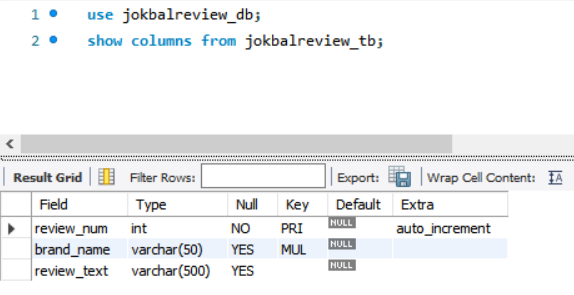
생성한 테이블의 컬럼은 위 사진과 같다.
review_num : 고유번호 (자동으로 부여됨)
brand_name : 브랜드명 (따로 수집하지 않고 코드에서 각 브랜드 이름을 넣어줬음)
review_text : 수집된 리뷰
MySQL 연결 코드
전에 크롤링할 때도 사용했던 MySQL 연결 코드 파일을 그대로 사용하였다.
한번 작성해놓으면 쉽게 import할 수 있어서 편하다.
password에는 실제 MySQL 비밀번호를 작성하면 된다.
주의할 점은 kill_chrome 함수는 크롬 프로세스를 다 종료시키기 때문에 이 함수를 사용한다면 크롬창에 중요한건 없는지 확인한 후 실행시켜야 한다.
import mysql.connector
import subprocess
import re

# MySQL 서버 연결 정보
host = '127.0.0.1'
database = 'jokbalreview_db'
user = 'root'
password = ' '

# MySQL 서버에 연결
conn = mysql.connector.connect(host=host, database=database, user=user, password=password, use_pure=True)

# 커서 생성
cursor = conn.cursor()

def kill_chrome():
    #KILL, TASKKILL / 프로세스를 종료하는 명령을 의미
    subprocess.call("TASKKILL /f /IM CHROME.EXE")
    subprocess.call("TASKKILL /f /IM CHROMEDRIVER.EXE")
최종코드
코드 실행 전 url 과 brand_name은 직접 입력했다.
각 섹션마다 대기시간을 넣어줘서 로딩되기 전에 진행돼 꼬이지 않게 함. 또한 매크로 탐지도 피할 수 있다.
코드 진행과정은 아래와 같다.
- 크롬을 통해 url 접속
- 스크롤을 통해 리뷰 버튼이 보이도록 함
- 리뷰 클릭
- 필터 클릭 (랭킹순)
- 리뷰 수집 및 저장 (중복 데이터 저장X, 페이지 넘기는 코드 포함)
- 필터 클릭 (별점 낮은순)
- 리뷰 수집 및 저장 (중복 데이터 저장X, 페이지 넘기는 코드 포함)
- 종료
import time
import random
# mysql 연결 코드 파일 import하기
from mysql_info_jokbal import *
from selenium import webdriver
from selenium.webdriver.common.by import By
from selenium.webdriver.support.ui import WebDriverWait
from selenium.webdriver.common.action_chains import ActionChains
from selenium.webdriver.support import expected_conditions as EC
from selenium.webdriver.common.keys import Keys

# --- 설정 및 초기화 ---
target_counts = {"랭킹순": 70, "평점 낮은순": 30}
total_collected_count = 0
url = " "
random_delay = random.uniform(2, 9)
brand_name = ' '

# SQL 쿼리 (컬럼에 맞춰 수정)
query = "INSERT IGNORE INTO jokbalreview_tb (brand_name, review_text) VALUES (%s, %s)"

page_index = 1

# kill_chrome()

driver = webdriver.Chrome()
driver.get(url)

# 종종 로봇이 아님을 증명하는 페이지가 뜨기 때문에 대기시간을 넉넉하게 설정함
wait = WebDriverWait(driver, 10)
time.sleep(random.uniform(5, 10))

# 스크롤
for c in range(3,7):
    driver.find_element(By.TAG_NAME,'body').send_keys(Keys.PAGE_DOWN)
    time.sleep(2)

# 리뷰 클릭
try:
    review_button = driver.find_element(By.XPATH, "//a[@data-name='REVIEW']")
    ActionChains(driver).move_to_element(review_button).click().perform()
    time.sleep(2)
    print("리뷰 버튼 클릭 성공")
except Exception as e:
    print(f"리뷰 버튼을 찾거나 클릭하는 데 실패했습니다: {e}")

time.sleep(random_delay)

for filter_name, limit in target_counts.items():
    print(f"\n>>> {filter_name} 필터 수집 시작 (목표: {limit}개)")

    page_index = 1

    # 1. 필터 버튼 클릭
    try:
        filter_btn = wait.until(EC.element_to_be_clickable((By.XPATH, f'//a[contains(text(), "{filter_name}")]')))
        driver.execute_script("arguments[0].click();", filter_btn)
        time.sleep(3)
        print(f"{filter_name} 버튼 클릭 성공")

    except Exception as e:
        print(f"{filter_name} 버튼 클릭 실패: {e}")
        continue

    current_filter_collected = 0

    while current_filter_collected < limit:
        try:
            # 리뷰 박스 요소들 찾기
            review_elements = driver.find_elements(By.CSS_SELECTOR, 'li.PxsZltB5tV')

            if not review_elements: break

            for element in review_elements:
                if current_filter_collected >= limit:
                    break

                print(f"\n{page_index}페이지...\n")

                # 리뷰 본문 추출
                try:
                    # 부모 클래스를 거쳐서 span을 찾는 방식
                    # comment_text = element.find_element(By.XPATH, ".//div[contains(@class, 'KqJ8QqwO82')]/span").text.strip()
                    comment_text = element.find_element(By.CLASS_NAME, 'KqJ8Qqw082').text.strip()
                except:
                    continue

                if comment_text:  # 내용이 있는 경우에만 저장
                    total_collected_count += 1
                    # (review_num, brand_name, review_text)
                    review_data = (brand_name, comment_text[:500])

                    try:
                        cursor.execute(query, review_data)
                        conn.commit()
                        current_filter_collected += 1
                        print(f"[{filter_name}] {current_filter_collected}/{limit} 완료")
                    except mysql.connector.errors.IntegrityError:
                        print("중복 데이터 건너뜀")
                        total_collected_count -= 1 # 중복 시 카운트 되돌림

            if current_filter_collected >= limit:
                break

            # --- 페이지네이션 ---
            page_index += 1
            next_page = str(page_index)

            try:
                if int(next_page) % 10 == 1:
                    # '다음' 버튼(> 모양) 찾기
                    next_btn = driver.find_elements(By.CLASS_NAME, "JY2WGJ4hXh")
                    if next_btn:
                        next_btn[-1].click()
                        print(f">>> {next_page}페이지 그룹으로 이동")
                    else:
                        print(">>> 다음 페이지 그룹이 없습니다. 수집 종료.")
                        break
                else:
                    # 숫자 페이지 번호들 찾기
                    page_elements = driver.find_elements(By.CLASS_NAME, "hyY6CXtbcn")
                    clicked = False

                    for pg in page_elements:
                        if pg.text == next_page:
                            # # 스크롤을 이동시켜 클릭 가능하게 만듦
                            # driver.execute_script("arguments[0].scrollIntoView();", pg)
                            pg.click()
                            clicked = True
                            print(f">>> {next_page}페이지 클릭 성공")
                            time.sleep(random_delay)
                            break

                        # 만약 모든 페이지 요소를 뒤졌는데 다음 페이지 번호가 없다면?
                    if not clicked:
                        print(f">>> 더 이상 클릭할 페이지({next_page})가 없습니다. 수집을 종료합니다.")
                        break

                time.sleep(random.uniform(2.5, 4.0)) # 페이지 로딩 대기
            except Exception as e:
                print(f"페이지 이동 중 오류 발생: {e}")
                break

        except Exception as e:
            print(f"오류 발생: {e}")
            break

print(f"\n 수집 완료! '{brand_name}' 총 {total_collected_count}개 리뷰 저장됨.")
'공부 > 빅데이터 분석' 카테고리의 다른 글
| [MySQL] .csv파일로 저장하고 엑셀에서 열기 (0) | 2025.12.27 |
|---|---|
| [웹크롤링] 네이버 스마트스토어 리뷰 크롤링 (12) | 2025.07.10 |
| [웹크롤링] 쿠팡 후기 크롤링 (2) | 2025.07.04 |
| [MySQL] 데이터베이스 구축 및 테이블 생성 (0) | 2025.07.02 |
| [웹크롤링] 유튜브 숏츠 댓글 크롤링하기 (2) | 2025.06.12 |


